
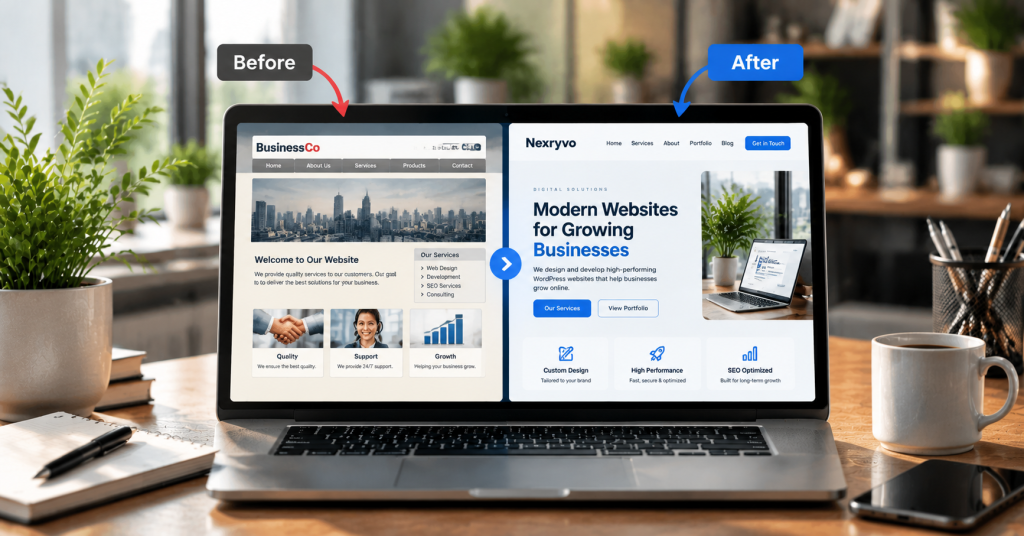
Your website plays an important role in how customers perceive your business. It introduces your brand, explains your services, builds trust, and helps potential customers decide whether they want to work with you.
But what happens when your website no longer reflects the quality of your business?
Perhaps the design looks outdated, pages take too long to load, or visitors struggle to find important information. You may also notice that your website receives traffic but generates fewer inquiries than expected.
These problems can indicate that your website needs more than a few small updates.
A professional WordPress website redesign can help improve your website’s appearance, functionality, performance, and overall user experience.
However, redesigning a website is a significant decision. You should understand what is actually wrong before investing in a new design.
In this guide, we explore seven common signs that your WordPress website needs a redesign, why these issues matter, and what you can do to improve your online presence.
1. Your Website Design Looks Outdated
First impressions matter, especially when potential customers are evaluating your business online.
If your website still uses outdated layouts, inconsistent typography, old-fashioned graphics, or cluttered page designs, visitors may question whether your business keeps up with modern expectations.
An outdated website can also make it difficult to communicate your brand identity effectively.
For example, imagine a professional consulting company using a website with small text, outdated stock images, inconsistent colors, and an unorganized homepage.
Even if the company provides excellent services, its website may not communicate that level of professionalism.
Common Signs of Outdated Website Design
- Old-fashioned page layouts
- Inconsistent fonts and colors
- Low-quality or outdated images
- Cluttered navigation menus
- Poor spacing and visual hierarchy
- Outdated buttons and design elements
- Branding that no longer matches your business
How a Website Redesign Helps
A professional redesign can introduce a cleaner layout, consistent typography, modern visual elements, and improved content organization.
It also provides an opportunity to update your website according to your current brand identity.
The goal should not simply be to make your website look modern. It should make your business information easier to understand and help visitors navigate the website more confidently.
Practical tip: Review your website alongside the websites of competitors in your industry. Look at their navigation, page layouts, content presentation, and mobile experience. Identify where your website creates unnecessary friction.
2. Your Website Is Not Mobile-Friendly
Customers access business websites through smartphones, tablets, laptops, and desktop computers.
If your website does not adapt properly to different screen sizes, you may be creating an unnecessarily difficult experience for mobile visitors.
A website that looks attractive on a desktop may still have problems on smaller screens.
For example:
- Text may appear too small to read.
- Navigation menus may become difficult to use.
- Images may extend beyond the screen.
- Buttons may be too close together.
- Contact forms may be difficult to complete.
- Important content may be hidden or poorly arranged.
These problems can make visitors leave without exploring your services.
Why Mobile-Friendly Design Matters
Google primarily uses the mobile version of website content for indexing and ranking through its mobile-first indexing approach.
This makes mobile usability an important consideration for both visitors and search visibility.
How a WordPress Website Redesign Helps
A redesign can introduce responsive layouts that adapt to different screen sizes.
It also allows developers to improve:
- Mobile navigation
- Button placement
- Font sizes
- Image scaling
- Form usability
- Page spacing
- Content hierarchy
Practical tip: Test your website using different smartphones and tablets. Pay attention to how easily visitors can navigate your pages, read content, and complete important actions.
3. Your Website Loads Slowly
Website speed is another important reason to consider a WordPress website redesign.
Visitors expect websites to respond quickly. If your pages take too long to load, users may become frustrated and leave before interacting with your content.
Slow performance can result from several technical issues, including:
- Poor-quality hosting
- Oversized images
- Excessive WordPress plugins
- Unnecessary JavaScript and CSS
- Poorly configured caching
- Inefficient database queries
- Heavy themes and page builders
- Third-party scripts
Not every slow website needs a complete redesign. Sometimes, targeted speed optimization is enough.
However, if performance problems are caused by an outdated theme, inefficient website architecture, and excessive technical dependencies, a redesign may provide a better long-term solution.
How a Redesign Can Improve Performance
During a redesign, developers can review the existing website structure and identify unnecessary elements.
Possible improvements include:
- Using a lightweight theme or custom design
- Optimizing images and media files
- Reducing unnecessary plugins
- Implementing caching
- Improving code efficiency
- Optimizing database performance
- Reviewing third-party integrations
Google’s Core Web Vitals provide useful measurements of loading performance, interactivity, and visual stability.
You can evaluate your website using Google PageSpeed Insights before deciding which improvements are necessary.
Practical tip: Run your important website pages through PageSpeed Insights. Check both mobile and desktop results rather than focusing only on the homepage.
4. Your Website Is Not Generating Enough Leads or Conversions
A business website should help visitors take meaningful actions.
Depending on your business model, these actions might include:
- Requesting a quote
- Booking an appointment
- Purchasing a product
- Submitting a contact form
- Calling your business
- Signing up for a newsletter
If your website attracts visitors but generates very few inquiries or sales, the problem may involve more than traffic.
Your website design and user experience may be preventing visitors from taking action.
Common Conversion Problems
- Unclear calls to action
- Confusing service descriptions
- Complicated navigation
- Missing contact information
- Poorly designed forms
- Weak trust signals
- Unclear value propositions
- Difficult checkout processes
For example, a web development agency may receive visitors through Google but fail to generate inquiries because its service pages do not explain the development process, pricing expectations, or next steps clearly.
How a Website Redesign Helps
A conversion-focused redesign places greater emphasis on the visitor’s journey.
It can improve:
- Homepage messaging
- Service page structure
- CTA placement
- Contact forms
- Trust-building elements
- Testimonials and case studies
- Navigation and page hierarchy
The purpose is to make it easier for potential customers to understand your services and decide what to do next.
Practical tip: Review your website analytics and conversion data before redesigning. Identify which pages receive visitors, where users leave, and which actions are rarely completed. This helps you make decisions based on actual website behavior rather than assumptions.
5. Your Website Is Difficult to Update and Maintain
Your business changes over time. You may introduce new services, update pricing, publish new content, or change your branding.
Your website should make these updates manageable.
However, some older WordPress websites become difficult to maintain because of outdated themes, incompatible plugins, poorly organized page structures, or excessive custom modifications.
You may experience problems such as:
- Difficulty editing website content
- Plugin compatibility errors
- Broken page layouts after updates
- Outdated themes
- Unnecessary plugin dependencies
- Limited customization options
- Frequent technical issues
These problems can make even small website updates time-consuming.
How a WordPress Website Redesign Helps
A redesign provides an opportunity to review the website’s technical foundation.
Developers can simplify the structure, replace outdated components, organize reusable layouts, and improve content management.
Depending on your requirements, they may use:
- Gutenberg
- Elementor
- Divi
- Beaver Builder
- Custom WordPress development
The right approach depends on how your business manages website content and what functionality you need.
Practical tip: Before choosing a new theme or page builder, consider who will manage the website after launch. A good redesign should make everyday content updates easier, not create additional technical dependency.
6. Your Website Structure and SEO Are Not Supporting Business Growth
Search engine optimization is not just about adding keywords to website content.
Your website structure also influences how search engines discover and understand your pages.
If your website has poor navigation, confusing URLs, duplicate content, missing metadata, or weak internal linking, it may be difficult to maintain a strong SEO foundation.
Common SEO-related website problems include:
- Poor heading hierarchy
- Unorganized page structure
- Duplicate or unnecessary pages
- Broken internal links
- Missing or incorrect canonical tags
- Poor mobile usability
- Weak internal linking
- Difficult-to-manage service pages
For example, a company offering several different services may have all its offerings listed on one general page.
This makes it harder to provide detailed information about each service and create focused landing pages for different customer needs.
How a Redesign Can Improve Your SEO Foundation
A professional redesign can help organize your website around your business offerings and customer search intent.
This may involve:
- Creating dedicated service pages
- Improving navigation and page hierarchy
- Reviewing URL structures
- Optimizing internal links
- Improving mobile usability
- Implementing appropriate structured data
- Reviewing indexing and redirect requirements
However, redesigning your website does not automatically improve search rankings.
Your content quality, relevance, backlinks, technical implementation, and ongoing SEO work remain important.
Important: Protect your existing SEO value during a redesign. Review important URLs, preserve valuable content, implement appropriate 301 redirects when URLs change, and monitor indexing after launch.
Practical tip: Check Google Search Console before starting the redesign. Identify pages receiving organic traffic and protect their content and URL structures wherever possible.
7. Your Website No Longer Reflects Your Business Goals
Your website should evolve alongside your business.
A website built when you first started may no longer support your current services, target audience, or marketing strategy.
For example, a small business may initially need only a homepage, about page, and contact form.
As the company grows, it may introduce new services, expand into different markets, launch an online store, or invest in content marketing.
The original website structure may no longer be suitable.
Signs Your Website No Longer Matches Your Business
- Your services have changed significantly.
- Your target audience is different.
- Your branding has been updated.
- You need new landing pages.
- Your website cannot support required integrations.
- Your business needs an online store.
- Your current design limits new functionality.
How a Redesign Supports Business Growth
A strategic redesign begins with understanding your current business objectives.
Developers can then create a website structure that supports your services, marketing activities, and future functionality.
For example, a growing professional services company may need dedicated service pages, case studies, consultation booking, CRM integration, and a resource center.
A properly planned redesign can bring these elements together within a more organized website.
Practical tip: Review your website whenever your business model, services, or target audience changes significantly. Your website should represent what your business offers today, not what it offered several years ago.
Website Redesign vs. Website Refresh: Which Do You Need?
Not every website problem requires a complete redesign.
Sometimes, a few targeted improvements are enough.
Understanding the difference can help you avoid unnecessary development expenses.
| Website Refresh | Complete Website Redesign |
|---|---|
| Updates colors and typography | Rebuilds the overall design |
| Replaces outdated images | Restructures page layouts |
| Improves selected sections | Revises the entire user experience |
| Updates existing content | Reorganizes content and navigation |
| Makes minor functionality changes | Introduces new functionality |
| Suitable for websites with a solid foundation | Suitable for websites with deeper design or technical problems |
A website refresh is generally appropriate when your existing website structure works well but needs visual improvements.
A complete redesign may be more suitable when the design, functionality, performance, and structure all require significant changes.
Before making a decision, conduct a website audit to identify the actual problems.
What Should You Consider Before Redesigning Your WordPress Website?
Once you decide that a redesign is necessary, planning becomes essential.
A successful project should begin with a clear understanding of your website’s existing performance and future requirements.
Consider the following steps:
1. Define Your Business Goals
Decide what you want your redesigned website to accomplish. Your priorities may include generating leads, increasing sales, improving brand credibility, or supporting organic traffic.
2. Review Your Existing Website
Identify outdated pages, technical problems, poor-performing content, and unnecessary functionality.
3. Understand Your Target Audience
Consider what visitors need to know before contacting your business or purchasing your products.
4. Plan the Website Structure
Organize your pages, navigation, service categories, and content hierarchy before development begins.
5. Prioritize Mobile Experience and Performance
Make sure the redesigned website works smoothly across devices and follows performance best practices.
6. Protect Existing SEO Value
Preserve important URLs and content where possible. Plan redirects for pages that must move or be removed.
7. Choose the Right Development Partner
Work with a developer or agency that understands WordPress development, website design, performance, and your business requirements.
A well-planned redesign should solve existing problems while providing a stronger foundation for future improvements.
Final Thoughts: Is It Time for a WordPress Website Redesign?
Your website should support your business, not hold it back.
If your WordPress website looks outdated, performs poorly on mobile devices, loads slowly, or struggles to generate leads, it may be time to consider a redesign.
However, the right decision should always be based on your website’s actual problems and business objectives.
Sometimes, targeted improvements are enough. In other cases, a complete WordPress website redesign can provide the structure, functionality, and user experience your business needs.
The most important thing is to build a website that accurately represents your brand, serves your customers, and supports your long-term growth.
If your current website no longer meets those expectations, investing in a strategic redesign may be the right next step.